|
discoverpixy
|
|
discoverpixy
|
|
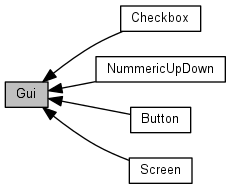
Modules | |
| Button | |
| Checkbox | |
| NummericUpDown | |
| Screen | |
Variables | |
| TOUCH_AREA_STRUCT | base |
| Basic geometry of the button. You only need to set the x1, y1, x2, y2 members of this struct. More... | |
| uint16_t | bgcolor |
| The 16-bit background color of the button. More... | |
| BUTTON_CALLBACK | callback |
| Callback. More... | |
| uint16_t | txtcolor |
| The 16-bit text color. More... | |
| uint8_t | font |
| The number of the font to use. More... | |
| const char * | text |
| The label of the button. More... | |
| TOUCH_AREA_STRUCT | base |
| uint16_t | fgcolor |
| bool | checked |
| CHECKBOX_CALLBACK | callback |
| uint16_t | x |
| uint16_t | y |
| uint16_t | fgcolor |
| int16_t | value |
| int16_t | min |
| int16_t | max |
| NUMUPDOWN_CALLBACK | callback |
| BUTTON_STRUCT | buttonUp |
| BUTTON_STRUCT | buttonDown |
| SCREEN_CALLBACK | on_enter |
| SCREEN_CALLBACK | on_leave |
| SCREEN_CALLBACK | on_update |
| struct SCREEN_S * | next |
The Gui Module
| TOUCH_AREA_STRUCT base |
| TOUCH_AREA_STRUCT base |
Basic geometry of the button. You only need to set the x1, y1, x2, y2 members of this struct.
| uint16_t bgcolor |
The 16-bit background color of the button.
| BUTTON_STRUCT buttonDown |
| BUTTON_STRUCT buttonUp |
| CHECKBOX_CALLBACK callback |
| NUMUPDOWN_CALLBACK callback |
| BUTTON_CALLBACK callback |
Callback.
| bool checked |
| uint16_t fgcolor |
| uint16_t fgcolor |
| uint8_t font |
The number of the font to use.
| int16_t max |
| int16_t min |
| struct SCREEN_S* next |
| SCREEN_CALLBACK on_enter |
| SCREEN_CALLBACK on_leave |
| SCREEN_CALLBACK on_update |
| const char* text |
The label of the button.
| uint16_t txtcolor |
The 16-bit text color.
| int16_t value |
| uint16_t x |
| uint16_t y |
 1.8.9.1

