|
| int | pixy_render_full_frame (uint16_t x, uint16_t y) |
| |
| int | pixy_render_cropped_frame (uint16_t x, uint16_t y, uint16_t xoffset, uint16_t yoffset, uint16_t width, uint16_t height) |
| |
| int | pixy_save_full_frame (FILE_HANDLE *handle) |
| |
| int | pixy_save_cropped_frame (FILE_HANDLE *handle, uint16_t xoffset, uint16_t yoffset, uint16_t width, uint16_t height) |
| |
| int | pixy_cc_set_region (uint8_t signum, uint16_t xoffset, uint16_t yoffset, uint16_t width, uint16_t height) |
| |
A collection of helper functions that allow receiving and rendering a frame from pixy onto the display. Furthermore you can select a color in a frame, to use for tracking.
| int pixy_cc_set_region |
( |
uint8_t |
signum, |
|
|
uint16_t |
xoffset, |
|
|
uint16_t |
yoffset, |
|
|
uint16_t |
width, |
|
|
uint16_t |
height |
|
) |
| |
Sets the color signature to the color in the selected region of the frame
- Parameters
-
| signum | the color signature number (1..7) |
| xoffset | The x-Coordinate of the topleft point of the region |
| yoffset | The y-Coordinate of the topleft point of the region |
| width | The width of the region |
| height | The height of the region |
- Returns
- 0 on success, otherwise the errorcode from pixy
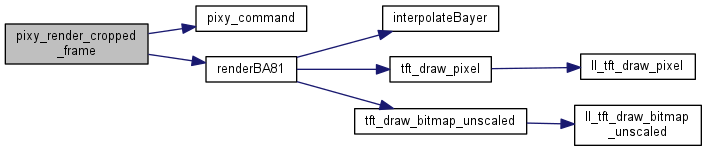
| int pixy_render_cropped_frame |
( |
uint16_t |
x, |
|
|
uint16_t |
y, |
|
|
uint16_t |
xoffset, |
|
|
uint16_t |
yoffset, |
|
|
uint16_t |
width, |
|
|
uint16_t |
height |
|
) |
| |
Receives a cropped frame from pixy and display's it on the display with the topleft corner at (x,y)
- Parameters
-
| x | The x-Coordinate of the top left corner to draw the image |
| y | The y-Coordinate of the top left corner to draw the image |
| xoffset | The x-Coordinate on the pixy image from where on you want the frame data |
| yoffset | The y-Coordinate on the pixy image from where on you want the frame data |
| width | The width of the image recorded from pixy |
| height | The height of the image recorded from pixy |
- Returns
- 0 on success, otherwise the errorcode from pixy
| int pixy_render_full_frame |
( |
uint16_t |
x, |
|
|
uint16_t |
y |
|
) |
| |
Receives a fullsized frame from pixy and display's it on the display with the topleft corner at (x,y)
- Parameters
-
| x | The x-Coordinate of the top left corner |
| y | The y-Coordinate of the top left corner |
- Returns
- 0 on success, otherwise the errorcode from pixy
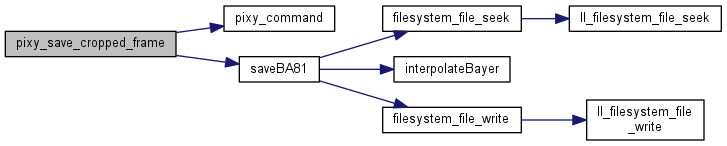
| int pixy_save_cropped_frame |
( |
FILE_HANDLE * |
handle, |
|
|
uint16_t |
xoffset, |
|
|
uint16_t |
yoffset, |
|
|
uint16_t |
width, |
|
|
uint16_t |
height |
|
) |
| |
Receives a cropped frame from pixy and saves it to the given file in the 24bit (b,g,a) format.
- Parameters
-
| handle | The file to write the data to. The file must be open and it should be seeked to the right position. |
| xoffset | The x-Coordinate on the pixy image from where on you want the frame data |
| yoffset | The y-Coordinate on the pixy image from where on you want the frame data |
| width | The width of the image recorded from pixy |
| height | The height of the image recorded from pixy |
- Returns
- 0 on success, otherwise the errorcode from pixy
Receives a fullsized frame from pixy and saves it to the given file in the 24bit (b,g,a) format. Use this method to write the bitmap-data part of a windows bitmap (.bmp). This method will neither open nor close the passed file.
- Parameters
-
| handle | The file to write the data to. The file must be open and it should be seeked to the right position. |
- Returns
- 0 on success, otherwise the errorcode from pixy









 1.8.9.1

